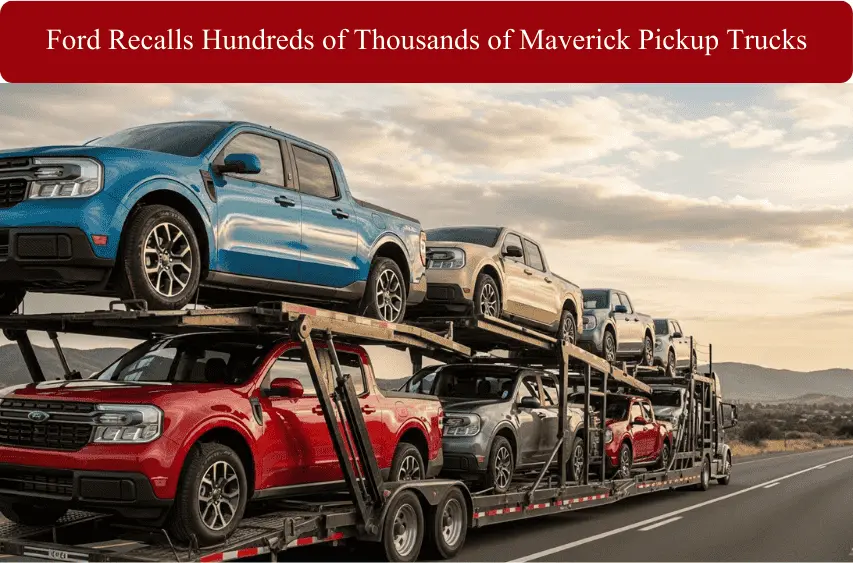
Ford Recalls Hundreds of Thousands of Maverick Pickup Trucks Over Rearview Camera Failure
When you hear “recall,” it’s easy to think it’s just another headline. But this one hits a lot closer to home for Ford owners. Ford is recalling hundreds of thousands of 2022–2024 Maverick pickup trucks because the rearview camera image can freeze while you’re in reverse.
That means you might see a picture on the screen that looks normal, but it’s actually an old, frozen frame. You think the path is clear, but the reality behind the truck has already changed. On a busy street, a tight driveway, or a crowded parking lot, that split second can be the difference between stopping safely and backing into someone or something.
A Quick Overview of the Rearview Camera Safety Issue
The problem centers on the backup camera image on Mavericks equipped with Ford’s Connected Touch Radio. Instead of continuously updating the video feed, the screen can freeze when you shift into reverse.
Sometimes it may look like a small glitch, but in real life it creates a false sense of safety. You glance at the display, assume it’s live, and move the truck. If a child, pedestrian, or another vehicle has entered your blind spot in that moment, the camera won’t warn you. That’s why regulators and Ford treat this as a genuine safety defect, not just an annoying tech bug.
How Many 2022–2024 Maverick Trucks Are Affected
Ford and safety regulators estimate that around 144,000+ Maverick trucks in the U.S. alone are potentially affected, with model years 2022, 2023, and 2024 under the recall umbrella. All of them share one common trait: they’re fitted with the Connected Touch Radio unit that controls the display for the rearview camera.
Owners will be asked to bring their trucks in so dealers can update the software free of charge. No new hardware, no paid upgrade, just a critical software fix that restores a reliable live video feed when you shift into reverse.
The Ford Maverick in Context
The Maverick isn’t some niche experiment for Ford. It’s one of the brand’s most important small pickups, especially for drivers who want truck utility without full-size weight, price, or fuel bills. Sales have climbed quickly since launch, and the Maverick has become a go-to choice for commuters, small business owners, and families who want something practical but easy to live with every day.
Which Ford Maverick Trucks Are Included in This Recall?
Not every Maverick on the road is part of this recall, but a very large number are. The recall mainly targets 2022, 2023, and 2024 Ford Maverick pickups that use a specific infotainment setup. If your truck was built in those model years and has the large touch screen with Ford’s newer software, there’s a good chance you’re in the group.
Model Years, Build Window, and Key Equipment
Ford and safety regulators traced the issue to software used during a certain production window. In simple terms, Mavericks from the 2022–2024 model years with the affected software and hardware combo are under the recall umbrella.
The key detail is the presence of the Connected Touch Radio unit. That’s the brain that runs your display screen and processes the rearview camera feed. Trucks with older or different radio units aren’t included because they don’t use the same software that can trigger the memory leak.
If you’re not sure which system your Maverick has, don’t stress over the technical names. The easiest way is to run a VIN check on Ford’s recall page or the NHTSA site, or call your local dealer and ask them to check your VIN in their system.
What “Connected Touch Radio” Means for Your Truck
“Connected Touch Radio” sounds complicated, but for you it mostly means this:
- You have a touchscreen infotainment display in the center of the dash.
- That screen controls audio, phone, some settings, and shows the backup camera image.
When you shift into reverse, this unit wakes up the camera, decodes the video signal, and shows it on your screen. Because the software lives inside this radio unit, any memory leak or software fault there can directly affect the camera image. That’s why the recall fix is a software update for the Connected Touch Radio, not a full camera replacement.
What’s Wrong With the Ford Maverick’s Rearview Camera?
At first glance, the camera looks like it’s working fine. You put the truck in reverse, and a clear image pops up. The problem is what happens over time, and under certain conditions, when the buggy software starts to misbehave.
How the Rear-View Camera Glitch Happens
The issue is linked to a memory leak in the software that handles the camera video. Think of it like this: every time the system runs, it uses memory. If that memory isn’t cleaned up properly, it slowly fills up. Eventually, the camera feed can’t refresh like it should.
So instead of streaming a live picture, the screen can freeze on an old frame or stop updating altogether. You shift into reverse, and what you see might be what was behind you a few seconds ago, not what’s there now.
Frozen Images, Black Screens, and Other Display Failures
Owners describe a few different symptoms:
- The camera image freezes and never updates while reversing.
- The display stays on a stale image from earlier.
- In some cases, the screen may go black instead of showing the live feed.
The scary part is that these problems are often intermittent. You might back up ten times with no issue, then suddenly the image locks up on the eleventh try. That inconsistency makes it hard to predict and easy to forget about—until it happens at the worst moment.
Why a Stuck Backup Image Is a Serious Safety Risk
When drivers see a clear picture on the screen, they naturally trust what they see. A frozen image breaks that trust without warning. If a child runs behind the truck, a car pulls in, or someone walks across your path while the image is stuck, you have no visual warning on the display.
That’s why regulators say this defect raises the risk of a crash, especially in parking lots, tight driveways, and busy neighborhoods where people and vehicles are constantly moving around behind you.
Inside Ford’s Investigation and NHTSA’s Involvement
This recall didn’t come out of nowhere. Ford and federal safety regulators watched real owner complaints pile up before acting. Once patterns appeared, the rear camera issue stopped being “just a glitch” and became a confirmed safety defect.
How the Problem Reached Regulators
Owners first reported frozen camera images and odd display behavior while reversing. Some filed complaints with NHTSA, others went back to dealers, and a few were logged as warranty claims. Over time, those small signals added up.
NHTSA then pushed Ford for answers. That’s when the company’s internal safety teams dug deeper, pulled data from the field, and treated the camera problem as a potential visibility risk, not just a tech annoyance.
What Ford Found in Testing
Ford and its screen supplier ran stress tests on different software versions. Under load, one version showed a memory leak that stopped the image from refreshing correctly. In plain words, the system ran out of room to keep updating the video.
Once engineers reproduced the freeze and confirmed the root cause, Ford’s safety committees signed off on a recall and approved a software update as the permanent fix.
What Maverick Owners Should Do Now
Ignoring a recall is never a good idea, especially when it touches visibility and backing safety. The fix is free, and the process is simple.
Step 1: Check Your VIN
Grab your registration, insurance card, or look at the dashboard by the windshield to find your VIN. Enter it on Ford’s recall page or the NHTSA recall site. In a few seconds, you’ll know if your Maverick is included.
Step 2: Book the Free Software Update
If there’s an open recall, call your local Ford or Lincoln dealer and book an appointment. The visit is free of charge, and many dealers can handle it during a normal service stop.
Step 3: Drive Smarter Until the Fix
While you wait, treat the camera as a bonus, not a guarantee.
Treat the Screen as a Helper, Not Your Only View
Use your mirrors, turn your head, and reverse slowly. Act like you don’t have a camera at all. That way, if the image freezes, your habits already keep you safe.
How This Fits Into Ford’s Bigger Safety Picture
Modern vehicles are packed with software, and that means more software-related recalls. The Maverick has also seen recalls for tail lights and hybrid-related risks, and other Ford SUVs have had their own trouble spots. If you’re comparing long-term ownership, looking into Ford Escape years to avoid and Ford Explorer years to avoid can help you understand patterns beyond just one truck.
Final Thoughts
A frozen camera image might look minor, but it can matter in the one moment you really need it. Take a few minutes to check your VIN, schedule the update, and drive like the tech could fail at any time. It’s a small effort that can prevent a very big problem.