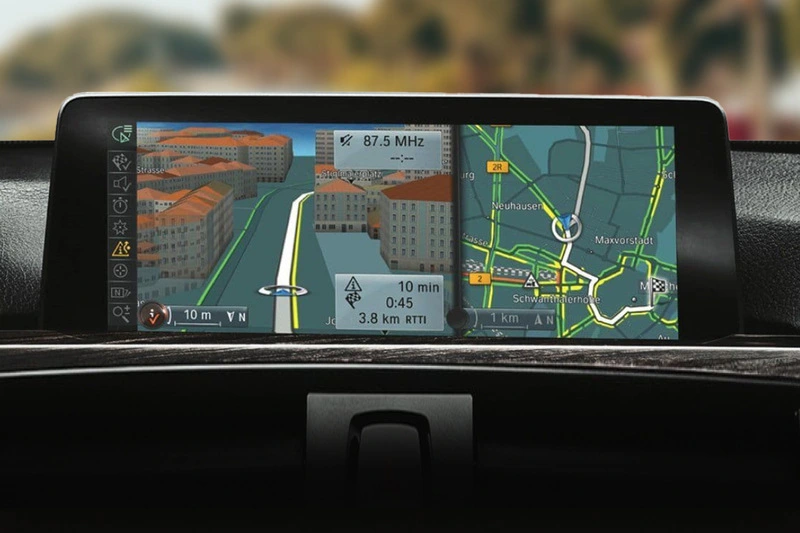
How to Use the BMW Navigation System?
Google Maps on your phone works just well enough. Everyone knows it. And yet there are things it does slightly worse than others – like the BMW Navigation System, which uses other routing algorithms and is based on different traffic data sources. Users online are often pleasantly surprised by the Bavarian solution and how it suggests much quicker routes. If you’d like to give it a try, understanding how to set it up in your car takes just a couple of minutes.
Read this article to find out how to use it and what it can do beyond basic navigation.
How Does the BMW Navigation System Work?
BMW navigation runs through the iDrive infotainment system and is controlled via the central iDrive controller, the touchscreen (on newer models), or voice commands. On current BMW models running OS 7, 8, or 9, the system uses BMW Maps – a cloud-connected navigation platform that pulls in live traffic data, real-time parking availability, speed limit information, and up-to-date points of interest.
The map data lives in the cloud rather than entirely on the car’s hardware, which means routing is faster and more current than older systems based on local storage. Like the ones in older BMW models, where navigation runs off locally stored map data – which works fine, but requires periodic manual updates to stay accurate.
How to Enter a Destination in BMW Navigation?
There are a few ways to get a destination into the system, depending on your BMW and how you prefer to interact with iDrive.
The most straightforward: press the navigation button (or tap the nav icon on the touchscreen), select “Enter Destination,” and type in an address. On newer iDrive generations with a proper touchscreen keyboard, this is fast enough to be genuinely usable. On an older rotary-only iDrive, typing an address letter by letter is the kind of character-building exercise you probably don’t want while stationary at a light.
Voice input is the more convenient, hands-free option when it’s available.
On cars with the BMW Intelligent Personal Assistant, just say “Hey BMW, navigate to [destination]” and it will handle the rest. On older systems with basic voice control, the trigger phrase and command structure are a bit more rigid, but it still beats manual entry when driving. You can also send destinations from the My BMW app directly to the car’s navigation – useful if you’ve been planning a route on your phone and want it ready to go when you get in.
What Can the BMW Navigation System Actually Do?
Beyond basic routing, a connected BMW navigation setup handles quite a bit more.
Live traffic integration re-routes around congestion automatically, and the system can show the estimated delay for alternative routes so you can decide whether it’s worth the detour. Real-time parking data in supported cities shows available spots near your destination before you arrive. Speed limit display keeps the current limit on-screen, which is genuinely useful on roads where signage is sparse.
There’s also the option to set intermediate stops along a route, useful for longer drives where you want to plan a fuel stop or a break without re-entering everything from scratch. On connected models, points of interest include ratings, opening hours, and sometimes photos – so you’re not committing to a petrol station that closed two years ago.
What If Your BMW’s Navigation Is Outdated or Missing Entirely?
Older BMW models sometimes shipped without factory navigation or with an early version of the system that nowadays shows its age. Maps that haven’t been updated in years, no live traffic, a slow interface – it’s a frustrating experience in a car that otherwise feels well-sorted.
This is where aftermarket navigation upgrades make sense. BimmerTech’s BMW Navigation Upgrades cover a range of solutions depending on what your car has and what it’s missing, including:
- Infotainment head unit upgrades and replacements – for cars where a full hardware refresh makes more sense than patching the existing system.
- Software activation coding – for BMWs that have the navigation hardware already fitted but never activated.
- Navigation control retrofits – adding or upgrading the iDrive controller and associated hardware on models where the original setup is too limited.
Which option fits your car depends on its spec and model year, and can be worked out via the BimmerTech website by entering your VIN. The result, either way, is a navigation setup that’s actually worth using instead of something you tolerate while your phone sits in the cupholder.
All You Need to Know About BMW Navigation
BMW’s navigation system is a capable piece of kit when it’s up to date and properly set up – voice input, live traffic, real-time parking, and seamless iDrive integration all make it worth using over a phone mount. The learning curve is mild: a session or two in the menus and it becomes second nature. And if your current setup isn’t up to scratch, there are straightforward upgrade paths that don’t involve a trip to the dealer or a bill that makes you question your life choices.